Flip-Up Armrests Racing Chair: Lumbar Support & Fit Tips

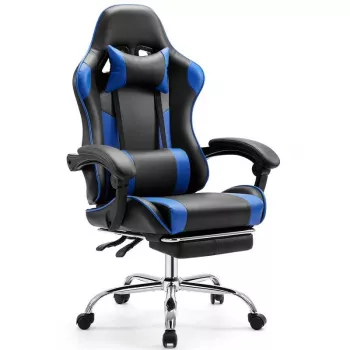
Ergonomic Racing Gaming Chair with Flip-Up Armrests and Lumbar Support
A comfortable chair can make long gaming sessions, study nights, and workdays feel easier on the back, shoulders, and wrists. This racing-style ergonomic chair combines adjustable height, flip-up armrests for closer desk access, and lumbar support aimed at improving seated posture and reducing pressure points during extended use.
What Makes This Chair Comfortable for Long Sessions
Racing-style chairs are built around the idea of staying centered and supported, especially when you’re focused for hours at a time. A tall, structured backrest helps encourage an upright, aligned seated position rather than letting the torso drift forward. Combined with a supportive seat and back padding, the goal is to reduce “hot spots” that can show up around the hips, lower back, and shoulder blades during long sits.
This style also typically includes contoured sides that help keep the torso aligned, which can be helpful when concentration leads to slouching. Whether the setup is for gaming, remote work, homework, or streaming, the biggest comfort upgrade usually comes from keeping your body supported without feeling locked into one rigid position.
Adjustable Height and Seat Positioning Basics
Adjustable height isn’t just about reaching the keyboard—it’s about keeping your shoulders relaxed and your elbows at a comfortable working level. A practical starting point is to set the chair so your elbows are close to desk height and your forearms can hover naturally over the keyboard or controller without shrugging your shoulders.
For lower-body comfort, aim for feet flat on the floor (or on a footrest) with knees around a 90° angle. Slide your hips slightly back into the seat so the lumbar area can do its job, instead of perching forward on the edge. Also keep in mind that monitor height plays a big role in neck comfort; positioning your eyes near the top third of the screen often helps reduce neck tilt. If your desk runs high, prioritize chair height for elbow comfort and add a footrest if your feet start to dangle.
For general workstation alignment guidance, OSHA’s workstation recommendations are a solid reference point: OSHA Computer Workstations eTool.
Flip-Up Armrests: Why They Matter at a Desk
Flip-up armrests are a simple feature with a big desk-space payoff. When space is tight, flipping the armrests up creates extra clearance so you can slide the chair under the desk and sit closer—useful for compact rooms, narrow desk cutouts, or keyboard trays that don’t leave much side-to-side room.
When you want forearm support, the armrests can be lowered into position for keyboard and mouse use (or for controller breaks between matches). They’re also handy for people who frequently switch input styles—mouse and keyboard for one game, controller for another—without constantly fighting the chair’s geometry. Flip-up armrests can also reduce interference for activities like guitar practice, drawing, or using a wider desk setup where fixed armrests bump the desk edge.
For comfort, keep support “light”: let your forearms rest without leaning hard on your elbows, and try to keep wrists neutral rather than cocked upward. If armrests encourage shrugging or push your shoulders forward, flip them up and move closer to the desk instead.
Lumbar Support and Backrest Setup
Lumbar support works best when it supports the natural curve of the lower back—think belt-line height rather than mid-back. A good fit should feel present but not aggressive; if it forces an exaggerated arch, it’s usually too intense or positioned incorrectly.
For more general ergonomics guidance, the Mayo Clinic offers a helpful overview: Mayo Clinic: Office ergonomics—Your how-to guide.
Quick Fit Guide: Find a Comfortable Starting Point
Setup Checklist for Common Desk Scenarios
| Scenario | Armrests | Chair Height | Lumbar Tip | Extra Fix |
|---|---|---|---|---|
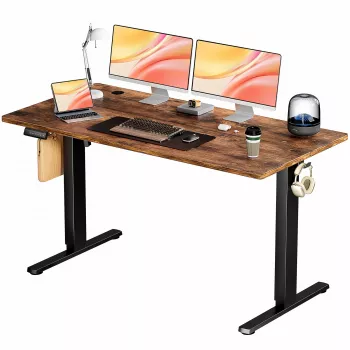
| Compact desk / limited space | Flip up to slide in closer | Match elbows to desktop | Keep support at belt line | Use a compact keyboard or pull monitor closer |
| Mouse + keyboard gaming | Down for light forearm support | Slightly higher if using a thick mousepad | Avoid slouching into the backrest | Lower sensitivity to reduce shoulder reach |
| Controller gaming / streaming | Optional (often up) | Comfort-first while keeping feet flat | Support lower back during longer sits | Add a small footrest if legs dangle |
| Work + study (typing heavy) | Down, aligned with forearms | Elbows ~90° | Neutral spine curve | Raise monitor to reduce neck tilt |
Care, Cleaning, and Long-Term Use
For industry context on furniture standards and testing, BIFMA is a commonly referenced organization: BIFMA (Business and Institutional Furniture Manufacturers Association).
Who This Style of Chair Tends to Suit
Recommended Gear (In Stock)
- Ergonomic Racing Gaming Chair with Adjustable Height, Flip-Up Armrests, and Lumbar Support ($108.17)
- Premium Laptop Sleeve for MacBook Air Pro 13-16 Inch with Protective Design ($24.51)
- 30W Portable Power Bank for Apple Devices ($43.51)
FAQ
Are flip-up armrests comfortable for long sessions?
They can be, as long as the armrests are positioned to support the forearms without forcing your shoulders upward. Use them down when forearm support helps, and flip them up when they block getting close to the desk; avoid leaning hard on the elbows.
How should lumbar support be positioned?
Place it around the belt-line area so it supports the natural curve of the lower back rather than pushing into the mid-back. It should encourage neutral posture without forcing an exaggerated arch, so make small adjustments and re-check after a few minutes of sitting.
What chair height is best for a standard desk?
Set the height so your elbows are near desk level with relaxed shoulders, while keeping your feet flat on the floor. If the desk is high and you must raise the chair, add a footrest to prevent leg strain.



Leave a comment